
Cloudflare adds analytics and per-agent access policies for personal agents
Cloudflare announced new analytics and access settings for personal agents, which are tools that convert a person’s instructions into requests and actions on websites. The company argues that site owners frequently cannot see which agents arrive or what they do, so judging whether that traffic benefits or endangers a business is hard.
What was launched
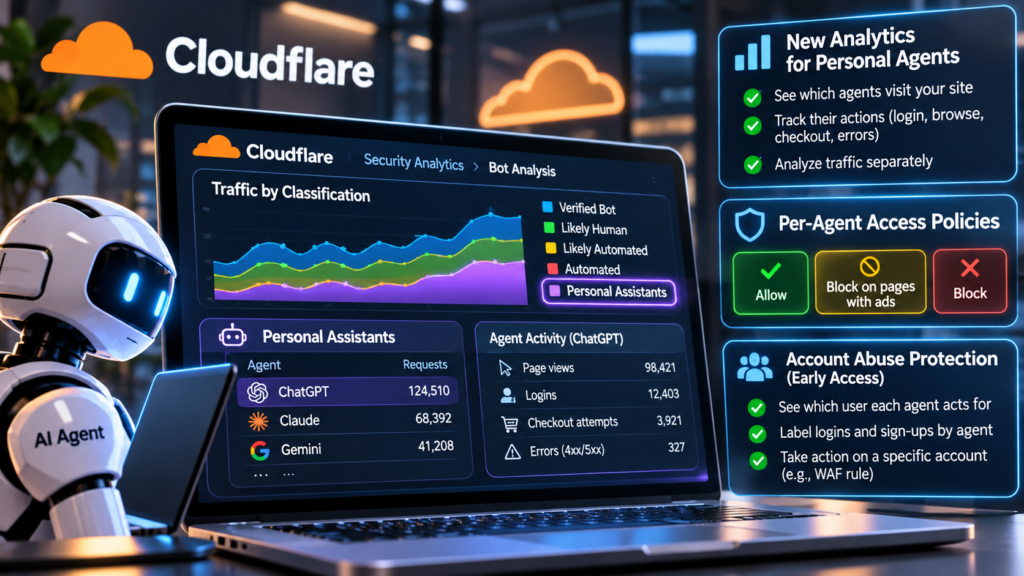
In Security Analytics, the Bot Analysis chart gains a Personal Assistants category. It appears next to the existing groupings: Verified Bot, Likely Human, Likely Automated and Automated. Selecting it lets security teams isolate personal agent traffic across a time range.
A new Personal Assistants widget in Top statistics names the agents visiting a site and counts the requests from each. Choosing a single agent makes the other widgets display only that agent’s activity: which paths it asks for, which status codes come back, and which networks it connects from. Cloudflare says this reveals whether an agent is signing in, browsing product pages, reaching checkout or running into errors.
The company also says its verified bot directory is the largest in the world, and that this information now feeds into the traffic details.
Account-level views
Sites that use Account Abuse Protection, currently in early access, get more detail. Site owners and fraud teams can see which user each agent acts for. An overview page lists the personal agents active among users and the number of accounts relying on them. Each login and sign-up event is now labeled to show if an agent submitted it and, if so, which agent. Fraud teams can narrow their account lists by AI assistant events or by how many AI assistants an account has.
A user’s account overview also names the agents working for that account. Cloudflare says an analyst looking at an odd login can distinguish an agent the customer has used for weeks from one appearing for the first time that day. If an attacker appears to be using an agent on an account, analysts can act on that account through a WAF rule tied to its Hashed User ID. Other people who use the same agent are not blocked.
Access policies
Cloudflare introduced AI bot policies in the summer, letting site owners decide separately on Search, Training and Agent behaviors. The Agents policy now offers finer options for supported personal agents, and the setting has been renamed AI Crawler and Agent access policies.
In Security Settings, owners choose an overall Agents policy and can then assign each supported agent its own choice of three: Allow (do not block), Block on pages with ads, or Block. Cloudflare’s example pairs an overall setting of blocking on pages with ads with a full allowance for one agent the owner wants to welcome. Search and Training policies are unchanged. When someone adds a new zone, onboarding asks whether the site earns money from ads and adjusts its recommended policies to match.
Why it matters for agents
This section is analysis, not reporting from the source. Agent operators may face more varied treatment. A site that can identify an agent can permit it on some pages and restrict it on others, rather than rejecting all automated traffic. Agents that are identifiable and supported may be better placed under per-agent policies. The source does not explain what makes an agent “supported” or how one gets added, and operators will probably want that clarified.
Cloudflare also names a next goal: helping sites keep the context of their relationships with users when agents sit in between. A site might identify the agent yet not know whether the user is a customer, what the user permitted the agent to do, whether a subscription exists, or which protections should apply. Cloudflare says this will require privacy-aware methods to carry user context through an agent, to help sites assess reputation, and to set clear accountability when something goes wrong. No timeline is given, and the company says it will share more as it works with agent operators and others. For now, the new controls address who is visiting and on what terms, not who the user behind the agent is.
Sources
- See the agents, set the terms: new visibility and control for personal agents — blog.cloudflare.com
This article was prepared with AI assistance and reviewed by an Emerge Times editor before publication. Licensed CC BY 4.0: credit “Emerge Times (emergetimes.com)”. Usage & License. Featured images are AI-generated illustrations; any logos shown are trademarks of their owners, and Emerge Times is not affiliated with them.